Sierra++ uses the features provided by Sierra Chart for custom study distribution :
This makes the installation safe and straightforward.
Step by step
Since Sierra++ has entered End Of Life, this page is dedicated to existing users with a valid license.
1. Ensure you have received Sierra++ files
Open the Sierra Chart Data Folder using Windows Explorer.
In the Sierra Chart Data Folder you should find two added files :
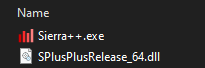
You can check that both files are digitally signed (right-click, Properties, “Digital Signatures” tab).
In case of any issue, check Sierra Chart documentation about custom study distribution or contact me.
2. Create a shortcut to the application
- Right-click on
Sierra++.exe
- Click “Pin to taskbar”, so that you can start it quickly.
3. Enjoy using it !
Start Sierra++ application and follow the Welcome screen indications.
